Overview
Autopilot Smart Mode is designed to reduce the likelihood of customer calls being flagged by carriers as "spam likely" by intelligently selecting a Direct Inward Dial (DID) phone number for each outgoing call. Autopilot Smart Mode uses Carrier Intelligence to significantly enhance the system's ability to match a clean DID with the lead's specific carrier.
How Autopilot Smart Mode works
Autopilot Smart Mode uses categorized DIDs based on their reputation across major carriers (AT&T, T-Mobile, and Verizon). Readymode iQ understands which carrier your leads are using as their service provider with a high level of certainty. Rather than guessing, the system uses a verified clean number on the lead's specific carrier—for example, a Verizon-clean DID for a Verizon number.
Navigating Autopilot Mode
To view your current Autopilot settings:
- In Readymode iQ, navigate to Advanced > Settings.
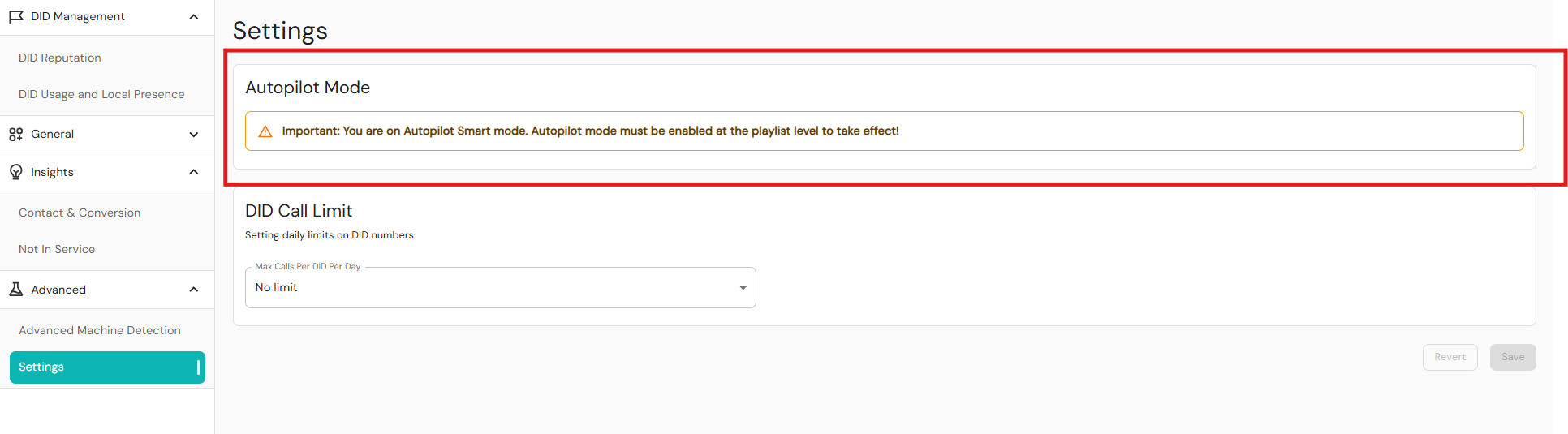
If your default setting is not currently set to Auopilot Smart Mode, Readymode can refresh your account settings. For more information contact [email protected].
DID Selection Logic
Autopilot Smart Mode increases the chance of having a clean caller ID appear when calling a lead, leading to a more probable outcome of not being flagged by the carrier. When a call is initiated, the system follows this logic to select a DID:
- From a larger list, a subset of DIDs is selected based on geographic proximity matching. These proximity-matched DIDs are grouped together.
- The system searches for a DID known to be clean for the lead’s specific carrier among the proximity-matched DIDs. If a clean carrier-matched DID is not found, the system considers all proximity-matched DIDs and assigns equal priority.
- The filtered DIDs are auto-rotated and prioritized based on usage in order to select a single DID.
For leads where the carrier is not one of the three major carriers (AT&T, T-Mobile, Verizon), the system defaults to using a DID that is clean on all carriers (referred to in the UI as "Ready").
The DID Reputation page displays the cleanliness with the following counter cards:
- All numbers: The total number of phone numbers available.
- Ready: Shows the total phone numbers not flagged by all carriers.
- AT&T: Shows the number of DIDs that are clean on AT&T.
- T-Mobile: Shows the number of DIDs that are clean on T-Mobile.
- Verizon: Shows the number of DIDs that are clean on Verizon.
- Flagged by All: Shows the number of DIDs that are flagged by all three carriers.
How to enable Autopilot Smart Mode
Enabling Autopilot Smart Mode will require changes to the Playlists page in Readymode iQ. For Playlists, the default rule's Autopilot setting applies whenever no specific cadencing rule matches the call attempt. For instance, if a call attempt lacks a matching rule, the default autopilot takes over. However, any matching cadencing rule overrides this with its own autopilot setting. For example, disabling autopilot in a rule for the first attempt, even if the default has it enabled. To enable Autopilot Smart Mode in your Playlists at the default rule level:
- In Readymode iQ, navigate to General > Playlists.
- Double-click to select a playlist from the table.
- Set the Autopilot toggle to Active.
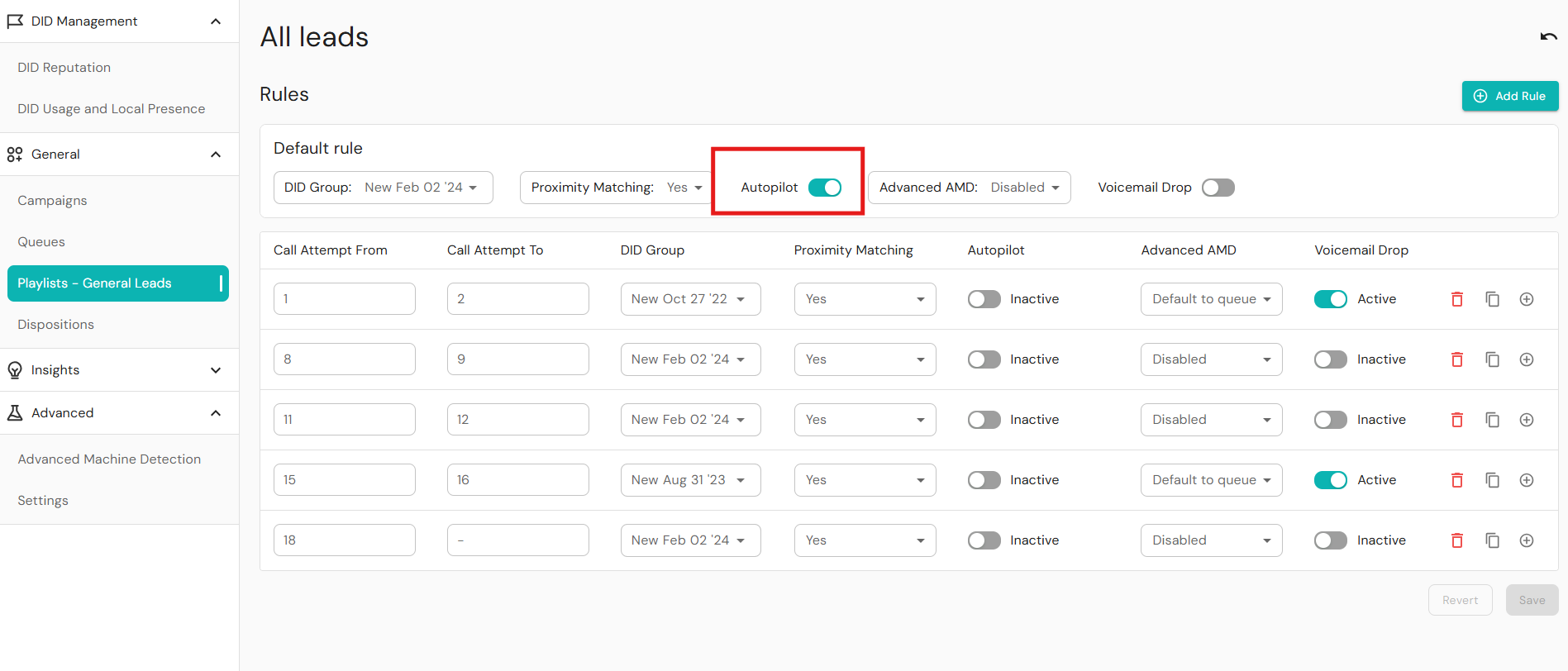
To enable Autopilot Smart Mode at the custom rule level:
- In Readymode iQ, navigate to General > Playlists.
- Double-click to select a playlist from the table.
- On the custom rule, set the Autopilot toggle to On.
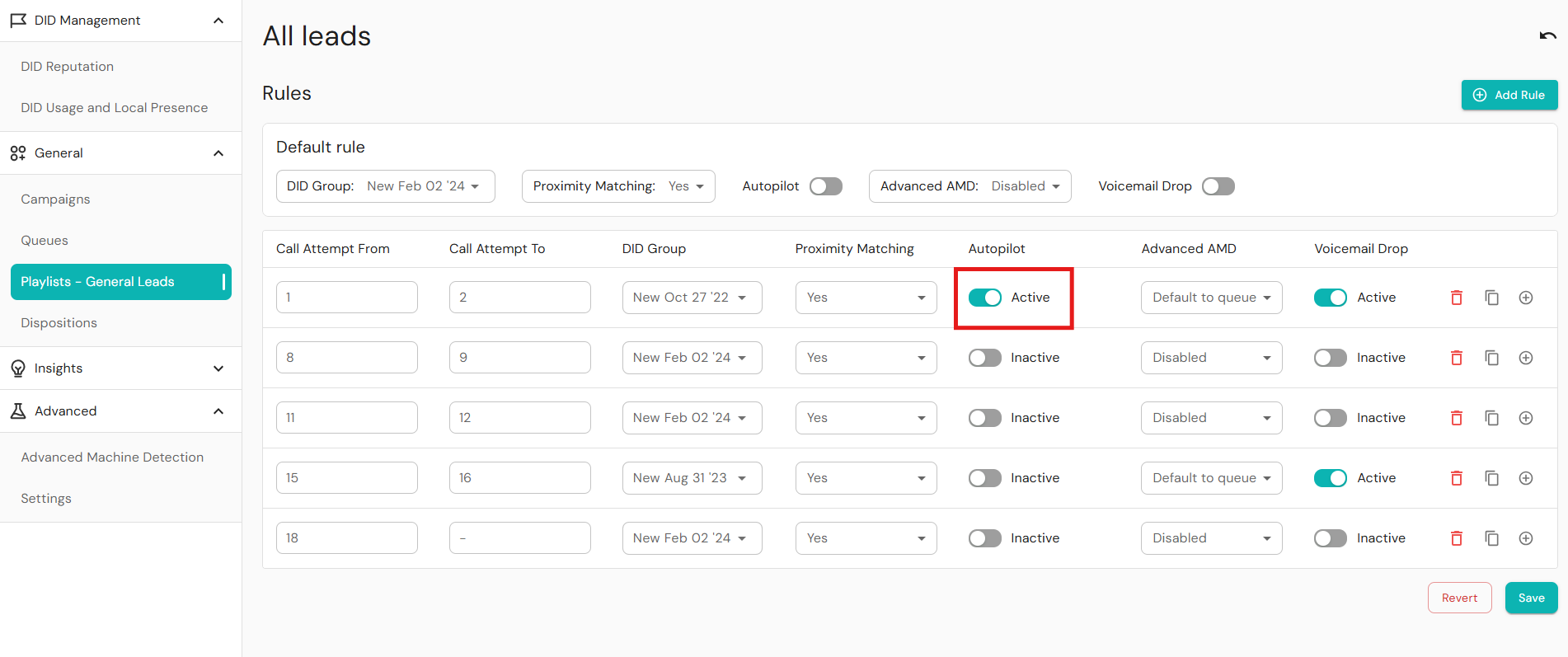
Turning the toggle on will engage the Autopilot Smart Mode for that custom rule only. Other rules will still have the default behavior set by the DID selection logic.
Was this article helpful?
That’s Great!
Thank you for your feedback
Sorry! We couldn't be helpful
Thank you for your feedback
Feedback sent
We appreciate your effort and will try to fix the article