Looking for a quick way to call your Callbacks, or remove yourself from a Queue? Learn how below.
Agent Dialer Settings
The options available under Agent Dialer Settings enable you to control how your Callbacks are dialed, and whether or not you receive calls from specific Queues.
Navigate to Agent Dialer Settings
To view your Agent Dialer Settings, click on the Dialer Status message at the top of your screen.

The Agent Dialer Settings panel will appear above the Dashboard.

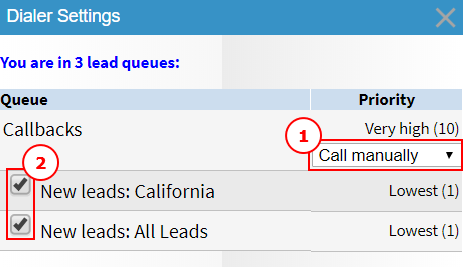
You can now view and adjust your Callback Setting (1) and Queue Availability Setting (2).
Callback Setting
Your Callback Setting enables you to decide if you would like to call your Callbacks manually, or if you would like the Dialer to call them for you. To view and adjust your Callback Setting, first navigate to Agent Dialer Settings.
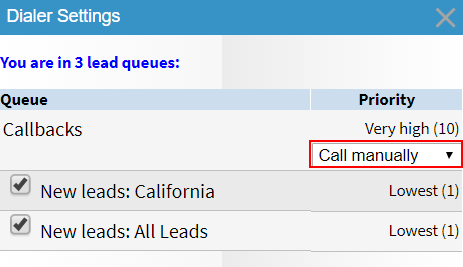
To change your Callback Setting, select an option from the Callback Setting drop-down menu.
Available options:
- Call manually - The Dialer will not dial your Callbacks. You will need to call them manually at the appointment time.
- Auto dial on time - The Dialer will dial your Callbacks for you at the appointment time.
- Auto dial [1 to 15] mins early - The Dialer will dial your Callbacks for you before the appointment time. You can choose how early you would like it to call.
Queue Availability Setting
When you are assigned to a Queue and in Ready Mode, you will be available to receive calls and Callbacks from that Queue by default. The Queue Availability Setting enables you to pause yourself in a Queue so that you do not receive calls or Callbacks from it.
Note: Editing the Queue Availability Setting requires the Dialer "Self-pause" Permission.
To make yourself unavailable, uncheck the checkbox next to a Queue. To make yourself available again, check it.
Was this article helpful?
That’s Great!
Thank you for your feedback
Sorry! We couldn't be helpful
Thank you for your feedback
Feedback sent
We appreciate your effort and will try to fix the article