Want to know how to dial someone within your company? Learn about the options below!
Internal Dialing
Readymode offers 2 options for making calls within your organization:
- Use the Directory - a handy list of available Users and other resources.
- If the User has an Extension, you can use this to dial them directly.
Using the Directory
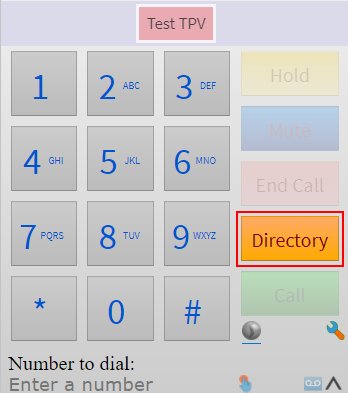
To access the Directory, open the Dial Pad and click the Directory button.
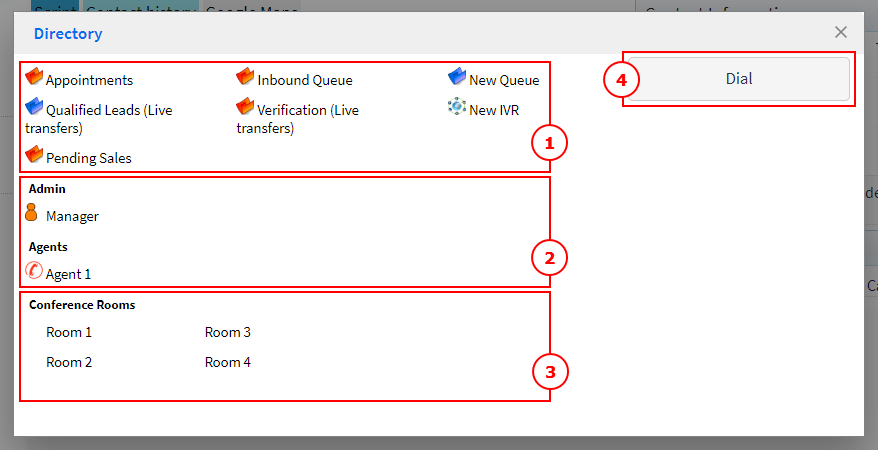
On the Directory, you'll see lists of available Queues and IVRs (1), Users (2) and Conference Rooms (3).
You'll also see a Dial button (4).
Note: When transferring a call, the Dial button will change to Warm or Cold Transfer buttons.
Dial Using the Directory
To dial using in the Directory, choose a resource from the Directory list (1) and click the Dial button (2).

Note: Agents will only be able to transfer calls to queues or users that they have been given the Store permission to.
Dial Using an Extension
You can use an Extension to dial a User directly. Dialing directly will put you through to the User's extension even if they are not available.
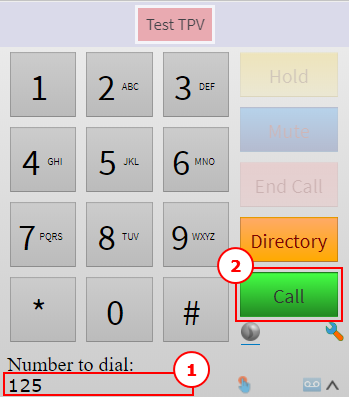
Using the Dial Pad, enter the extension in the Number to Dial field (1) and click the Call button (2) to connect.
Was this article helpful?
That’s Great!
Thank you for your feedback
Sorry! We couldn't be helpful
Thank you for your feedback
Feedback sent
We appreciate your effort and will try to fix the article